Introducing the Alumio Route Builder
Now connect, orchestrate, and govern integrations at scale from one visual interface

Branch stock, account terms and the collection point a trade customer actually uses move between Shopify Plus and Kerridge, so a price shown online is one that the branch can actually honour.



























A distributor running Kerridge runs branches, and a branch is not a warehouse. It holds its own stock, serves its own trade accounts and often prices differently, so the question a website has to answer before it can quote anything is which branch this customer belongs to. Without that, a national storefront shows one price and one availability to everybody, and the trade counter spends its day explaining why the site was wrong. Connecting Shopify Plus and Kerridge makes the branch explicit, and Alumio reaches Kerridge through the interface it makes available, as it would any reachable system.
DATA THAT FLOWS BETWEEN THEM
Branch stock
Trade accounts
Account prices
Sales orders
Collection points
Delivery slots


Stock and price are read for the branch the trade account belongs to, so a logged-in Shopify Plus customer sees what their own branch can supply rather than a national figure.
Account terms travel with the customer, so a trade buyer ordering online is charged what they are charged at the counter instead of being pushed to the retail price.
The collection point offered is the branch that actually holds the goods, which is what stops a customer driving to the wrong site for an order that was never there.
Because Shopify Plus orders reach Kerridge as orders, counter, phone and web sales sit in one order book rather than in a channel report somebody has to reconcile afterwards.
When a trade customer logs into Shopify Plus, Alumio reads the price and availability Kerridge holds for their branch and account, so the figure on the page is one that the branch can stand behind at the counter.
The collection points offered at checkout are the branches with the goods, so a customer choosing to collect is directed to a site that actually holds the order rather than to whichever branch happens to be nearest.
Orders placed on Shopify Plus are created in Kerridge against the branch and account they belong to, so a web sale is picked, invoiced and chased in exactly the same way in the same way as one taken at the trade counter.
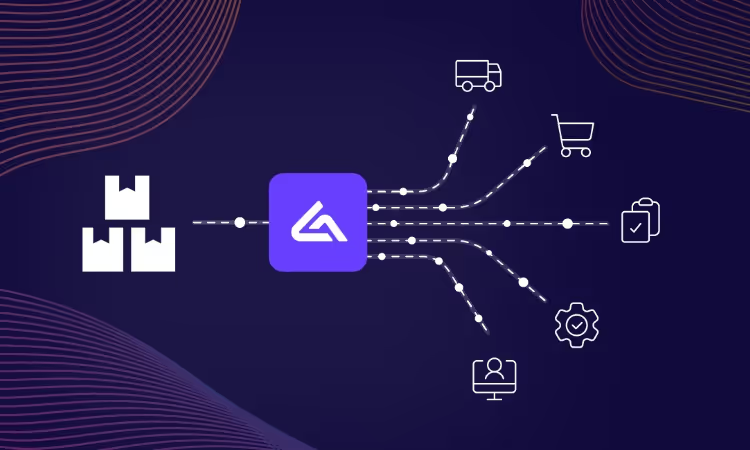
Alumio sits between sales channels and fulfillment systems as a governed integration backbone. Orders are routed, transformed, and validated, while status updates return to every channel.

Authenticate your systems using Alumio's pre-built connectors. Choose from 200+ connector packages in the marketplace, plus unlimited custom integrations.

Define how data fields map between systems in a visual interface. Adjust formats, enrich records, and apply business logic, no custom code required.

Configure flows to run in real time on events, on a schedule, or both. Reduce manual data entry and let Alumio handle movement and transformation between systems.
.svg)
Once your first integration is live, adding your ERP, PIM, WMS, or CRM connects to the same hub. Existing flows keep running. No rebuilding from scratch.

What the branch does that the website cannot is deliver, and that is where the next connection goes. A delivery scheduling and load planning tool is the common addition, because Kerridge holds the order and the vehicle that takes it is planned somewhere else, so a customer choosing delivery online is choosing something no system has committed to yet. Alumio holds that connection alongside this one, so a slot offered on Shopify Plus is a slot a branch can actually run.
The branch and the account come first, because nothing else can be answered without them. Alumio resolves the Kerridge branch a trade account belongs to, then reads the stock and price held for that combination and returns them to Shopify Plus. Retail visitors who are not logged in see the default you configure, so the storefront still works for somebody with no account at all.
No. The branch is the exception that would otherwise become code, and it is a lookup rather than logic: which Kerridge branch serves which trade account, what a logged-out Shopify Plus visitor sees, and which branches offer collection are all entries in Alumio's interface. A distributor's branch and account structure is particular to that business, so the Code Transformer stays available for a rule that will not sit in a table.
The branch its trade account is served by, and that has to be resolved before a price is shown rather than after checkout. Kerridge holds stock, terms and often prices per branch, so a Shopify Plus order without a branch is an order nobody can pick or invoice correctly, and a national price is wrong for most of the account base. Configuring the branch lookup as the first step is what makes everything after it correct.
An account that exists at one branch and not another is the failure this pair produces, and it looks like a pricing complaint rather than an integration fault. Requests are monitored live and their responses recorded, so a failed Kerridge branch lookup alerts immediately with its reason and retries where configured. The Shopify Plus storefront falls back rather than guessing, so nothing is quoted quietly.
Talk to an Alumio integration specialist. We'll map the right architecture for your systems, at the right scale, so your operations stay reliable through every change.










.svg)


