
What are Alumio Tasks?
When you log in to the Alumio cloud-native web environment, the dashboard presents several key metrics that can be grouped into two core aspects: integration Task highlights and integration Route insights. This reflects how the Alumio iPaaS works: Routes define and manage the flow of data between applications, while Tasks measure and monitor that data as it moves.
All other metrics, whether error detection, queue previews, data engine usage, memory pressure, or disk capacity, are essentially extensions of what your Routes are doing and how your Tasks are performing. Routes show where and how data flows, while Tasks reveal what actually happens as those flows run. By surfacing these layers together, the dashboard helps teams understand not only whether integrations are working, but also why issues occur, where resources are consumed, and how performance can be optimized.
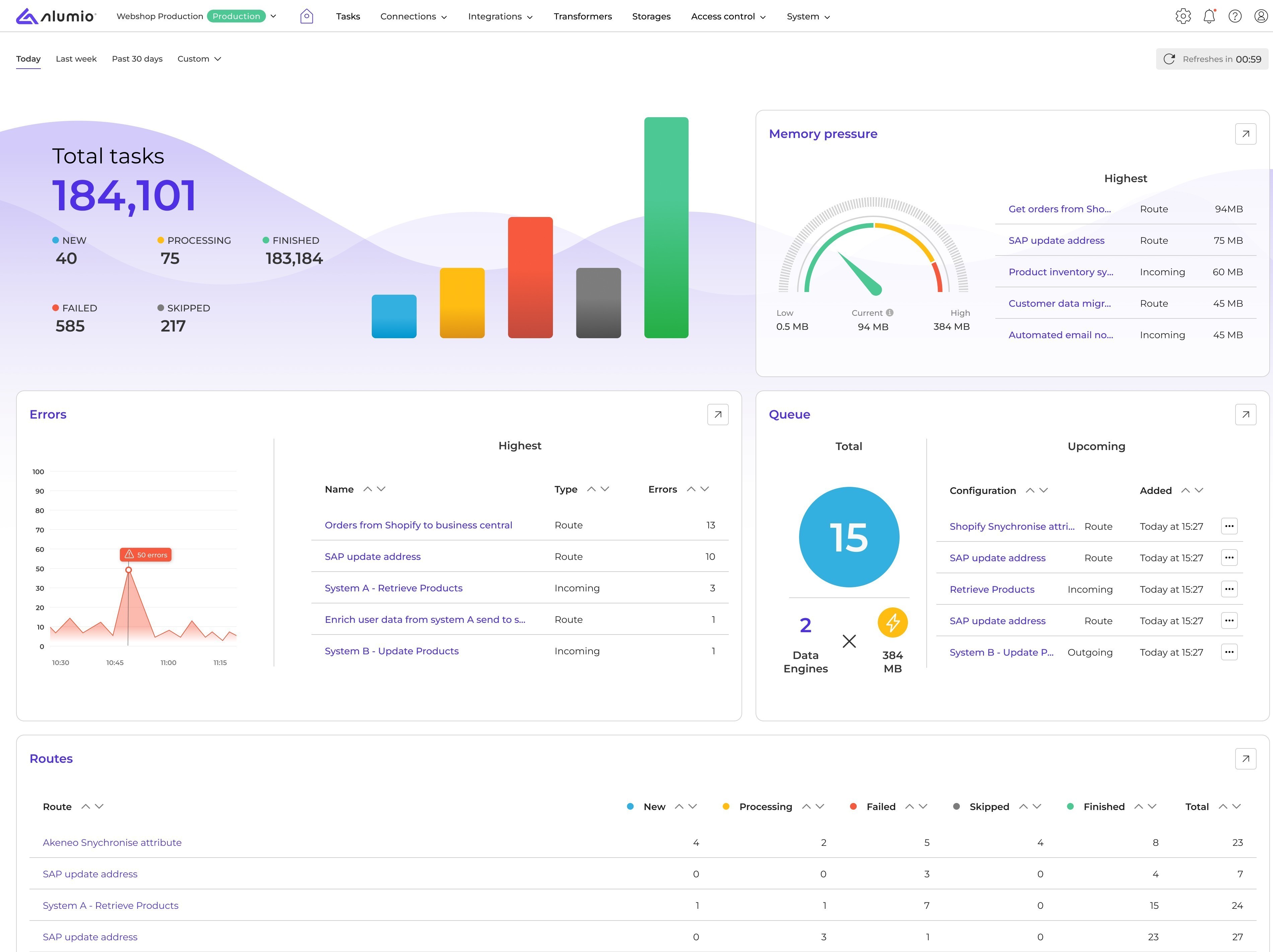
In other words, Tasks provide the lens through which you can track, monitor, and troubleshoot data from start to finish, giving clarity into the full integration process. That’s why, before exploring the nuances of creating integrations with Alumio Routes, it’s important to first understand what integration Tasks represent and how they reflect the way Alumio processes data.
What counts as a Task?
A Task in Alumio helps measure every data entity that moves from one application to another via the Alumio iPaaS. This involves data entities such as products, prices, stock, customers, or orders being exchanged between applications such as e-commerce, ERP, PIM, and CRM. It includes integrating sales data, marketing automation systems, and multichannel marketplace product listings. It also includes the exchange of manufacturing data such as production schedules, inventory levels, or PLM and PDM data.
Not limited to any industry or specific business environment, Alumio can also facilitate integrations for:
- Logistics: Tracking and delivery details between shipping carriers and order management systems.
- Retail & hospitality: POS transactions, customer loyalty program data, and booking confirmations.
- Travel & tourism: Flight or hotel reservations, itinerary updates, and passenger details.
- Education: Student enrollments, course registrations, and exam results exchanged between learning management systems.
- Finance: Various payment providers, transactions, invoicing, and reconciliation data between banks and accounting software.
If there's any endpoint that data can be retrieved from, as an API-driven solution, the Alumio iPaaS can work with that data, transform it, and then send it to multiple systems, applications, or data sources. A Task helps measure, track, and monitor the exchange of this data as it moves from one application to another via the Alumio iPaaS. Each Task is automatically generated when data is imported, transformed, or exported, allowing you to track the flow of data within an integration, at every step of the way.
To understand how Tasks in Alumio help exactly measure this, let’s delve into the different types of Task statuses in the next lesson.


.svg)
.svg)
.svg)
.svg)
.svg)
.svg)
